


How to read the product
Start with the question a page answers. Read its main message, check the evidence, then use the reference below for definitions and calculations.
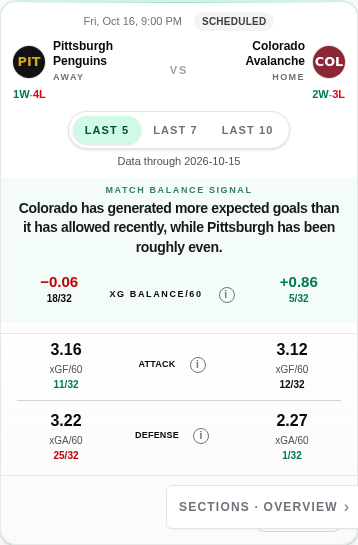
Check the period and data cutoff, then compare the balance and its attack and defense components.
- 1.Window and data cutoff
- 2.Chance balance
- 3.Attack and defense
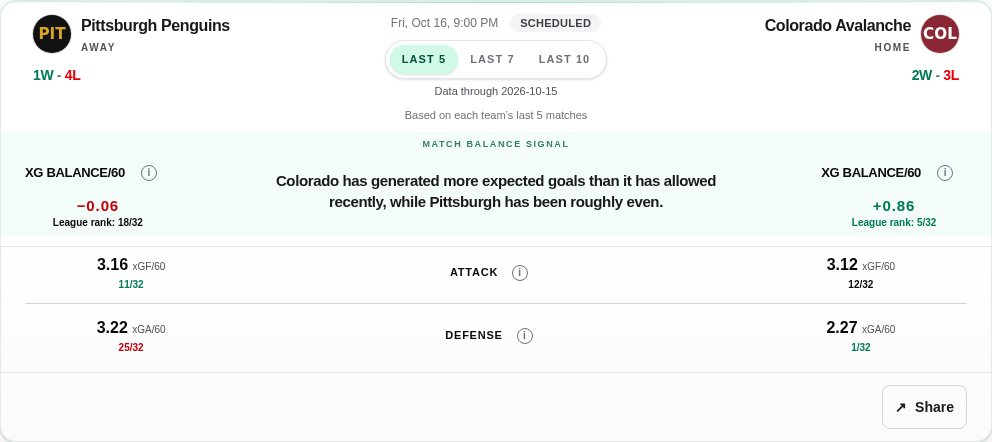
Check the period and data cutoff, then compare the balance and its attack and defense components.
- 1.Window and data cutoff
- 2.Chance balance
- 3.Attack and defense
Pregame
What do the teams bring into this game?
Reading details
- Read the top match headline and both team summaries; check Data through.
- Add Match Explanation and Expected Goals vs Result: what drives the picture, and have results followed the chances?
- Check goalies, special teams and Shot Profile, then Metric Comparison and Team Metrics. Use standings and recent games as result context.
Block map · 10
The map follows the page order; unavailable sections may not appear. Main Drivers highlights changes; Match Explanation adds detail.
Match overview
The teams’ recent chance creation and prevention, with season and opponent context where available.
More details
Read both teams and the data cutoff before looking for an advantage.
Main Drivers
The changes that stand out for each team, with the numbers behind them.
More details
Read each team's selected change and its supporting numbers.
Standings & Recent Games
League position and recent official results.
More details
Compare the run of results with the chance creation and prevention below.
Wins alone do not establish strong underlying play.
Expected Goals vs Result
Analytical goals alongside expected goals in the selected window.
More details
Separate chances created, chances allowed and the gap to actual goals.
A gap does not guarantee a future return to the average.
Goalie Context
The team's goaltending contribution relative to shots faced.
More details
Read GSAx with the sample and playing time.
It neither confirms the starter nor guarantees the next performance.
Match Explanation
The selected signals behind the matchup context.
More details
Read each conclusion with its supporting metrics, then relate it to the top summary.
Special Teams
Power-play and penalty-kill chance quality alongside official results.
More details
Distinguish xG per two minutes from percentages and opportunity frequency.
Quality does not determine how many penalties the game will have.
Shot Profile
Where the attacks create and the defenses allow attempts and xG.
More details
Check the matchup direction, situation, metric and Profile / Vs Season mode.
Metric Comparison
A closer comparison of the selected metric and its trend.
More details
Read the current level, then check how it developed.
Team Metrics
Grouped numerical detail for both teams, including recent versus Season.
More details
Check units, values and ranks separately.
A rank describes this metric, window and snapshot, not a probability.
Team
How is this team playing, and what has changed?
Reading details
- Start with Team Summary: xG Balance and the main team picture.
- Read Attack and Defense inside the summary, comparing recent xGF/60 and xGA/60 with Season.
- Use trends and opponent strength for context; explore Shot Profile, goaltending, special teams and the games list.
Block map · 9
Team Summary, Goaltending, Special Teams and Shot Profile have separate window controls. Changing one does not change the whole page.
Team header · Last game / Next game
Team identity, standings and the last and next game.
More details
Check the team and season; use the game links for match context.
Overview / Full Stats / Roster
Three alternative views of the team.
More details
Start with Overview; use Full Stats for detail and Roster for players.
Team Summary
xG Balance, Season strength, and Attack / Defense in one summary.
More details
Compare recent xGF/60 and xGA/60 with their own Season values; use the help beside each metric.
Season describes the broader record at this cutoff, not an unchanging ability.
Team Trends
How a selected metric develops across the season.
More details
Choose game-by-game, rolling or cumulative view and check the units.
A cumulative total is not the current rate.
Performance by Opponent Strength
Season-to-date results and process against different opponent levels.
More details
Check the number of games and the opponent's strength known before each game.
Small or unequal samples are not precise measures of superiority.
Goaltending
Results and workload for all goalies used in the selected window.
More details
Read GSAx/60 with total GSAx and official playing time.
The team unit does not represent one confirmed starter.
Special Teams
The selected PP or PK unit's chances and results.
More details
Check this block's window, chance-quality rate and official results together.
Shot Profile
Where the team creates or allows shots and expected goals.
More details
Use Profile for distribution and Vs Season for change from the baseline.
Games
Recent results and upcoming games, with available game details.
More details
Use Recent / Upcoming and open a game for its facts.
The recent games list is not the window selector for other blocks.
Compare
How do two teams differ, and how does one attack line up with the other defense?
Reading details
- Check the two teams and Comparison Window, then read Key Differences.
- Use Metrics & Trends for like-for-like metrics, then use Attack vs Defense to compare one team's attack with the other's defense.
- Explore Shot Profile and Zone Comparison, the longer Trend Comparison, and opponent-strength samples.
Block map · 7
Comparison Window
The selected pair and window for the main comparison.
More details
Choose two different teams and check the common cutoff.
Key Differences
Selected differences between the teams.
More details
Identify the metric and rank, then read the fuller context below.
These differences are not added into a winner score.
Metrics & Trends
The same metrics for both teams, with ranks and changes from Season.
More details
Compare attack with attack or defense with defense; keep values, ranks and deltas distinct.
Shot Profile
Paired profiles, Zone Comparison and Zone Details.
More details
Keep metric, perspective and situation aligned; on mobile, open Zone Comparison for the paired zone values.
Trend Comparison
Both teams' history for the selected metric.
More details
Check the time period and view before comparing the shape of the trends.
Attack vs Defense
One team's attack beside the other's defense, in both directions, plus PP against PK.
More details
Ask what the attack creates and what the opposing defense allows.
This is matchup context, not a simulation or outcome forecast.
Performance by Opponent Strength
Season-to-date performance by historical opponent strength.
More details
Compare the sample sizes for both teams.
The main Comparison Window does not turn these season splits into recent splits.
Post-game
What was known before, what happened, and did the game confirm, weaken, reverse or complicate that picture?
Reading details
- Read the final score and Post-game takeaway with its evidence.
- Check Pregame vs This Game and Result vs Process: separate the archived expectation from this game's chances and goals.
- Use Shot Profile, goaltending and special teams to explain the game; open the pregame snapshot to inspect what was saved.
Block map · 8
Score
The official final score.
More details
Start with the result and final status.
Official goals and the analytical goal population can differ.
Post-game takeaway
The completed game's main analytical message.
More details
Read the evidence behind the message and whether a verified pregame baseline is available.
Pregame vs This Game
Archived pregame rates alongside rates for this completed game.
More details
Changing the window changes the baseline only; This Game stays the same game.
Missing archives stay unavailable; current team stats do not replace them.
Result vs Process
Analytical goals compared with total expected goals for the game.
More details
Distinguish the official score, analytical goals and accumulated xG.
Game totals are not the recent per-60 rates shown before the game.
Shot Profile
This game's locations and the archived comparison when available.
More details
Check Game / Vs Pregame and open Zone Details for exact values.
One game has no league ranks or zone winner.
Goaltending
Goaltending contribution in this game.
More details
Read total GSAx, GSAx/60 and the goalies' actual playing time together.
Special Teams
PP/PK chance quality and official results in this game.
More details
Check time played and opportunities as well as goals.
A rate with missing or zero exposure is unavailable, not zero.
View pregame snapshot
The pregame presentation and its archive provenance, when saved.
More details
Check what was captured before play; archived wording remains in its original language.
A labelled reconstructed test example is not a historical archive.
Shot Profile
How much, where, and at what rate or quality? One reading model for all four contexts.
Reading details
- Check the metric: Attempts, xG or Goals; then Attack / Defense and All / PP / PK.
- Read the nine-sector distribution with its totals. Use rate, share and xG per attempt where available to distinguish volume, concentration and average chance quality.
- Check the reference mode and Zone Details, then the sample and exclusions beneath the map.
Across the four pages · 4
A larger share is not necessarily more total xG; xG per attempt describes average quality, not scoring efficiency. Goals maps exclude empty-net and shootout goals; official goals outside the nine-sector profile are shown separately, never assigned to a guessed zone.
Team
The team's own spatial pattern in the selected local window.
More details
Profile shows the pattern; Vs Season shows how it differs from the broader baseline.
Pregame
Chance creation and prevention in the matchup's pregame snapshot.
More details
Check the matchup direction and the same pregame cutoff as the rest of the match page.
Compare
Two spatial profiles under the same comparison settings.
More details
Use Zone Comparison for paired zone values and Zone Details for the detailed rows.
Post-game
Where this game's attempts, xG or goals came from.
More details
Game describes the completed game; Vs Pregame needs its exact archived baseline.
How the pieces connect
Team process
- xGF/60 · chance creation
- xGA/60 · chances allowed
- xG Balance/60 = xGF/60 − xGA/60
Read creation and prevention together; the balance describes both sides of play.
Recent versus normal
- W5 / W7 / W10
- Season · same cutoff
- Has recent play changed?
Compare a complete recent window with the broader baseline.
Match context
- Team process · opponent
- Goaltending · PP / PK
- A fuller view of the matchup
Read these perspectives together, not as independent points added into a prediction score.
From total to location
- xGF / xGA · how much expected-goal value
- Shot Profile · where it comes from
- Rate · share · xG per attempt
Location adds detail; distribution alone does not replace the overall process.
Recent windows show what has been happening lately. Season provides the broader baseline for what is normal for the team at the same data cutoff, not a prediction or a permanent level of ability. Windows & baselines →
01
Quick Guide
The most common numbers on the site, in plain language.
- What is xG?
- Expected goals (xG) add up the estimated scoring chance of each eligible attempt. An attempt worth 0.10 xG has an estimated 10% chance of becoming a goal. xG describes chance quality; it is not a prediction of the final score.
- xGF/60
- Expected goals created per 60 minutes of eligible play. Higher generally means stronger chance creation.
- xGA/60
- Expected goals allowed per 60 minutes of eligible play. Lower means stronger chance prevention.
- xG Balance/60
- xGF/60 minus xGA/60. A positive value means the team creates more expected-goal value than it allows.
- GSAx/60
- Goals Saved Above Expected per 60 minutes of official goalie time for the team's goaltending unit. Higher is better.
- PP Chance Quality
- Expected goals created per two minutes of power-play time. Higher is better.
- PK Chance Quality Allowed
- Expected goals allowed per two minutes of penalty-kill time. Lower is better.
- N/32
- The team's position in the 32-team NHL population for that metric and snapshot.
- Data through
- The latest fully processed NHL game day included in the analytical snapshot.
02
Data Timing & Pregame Snapshots
Pregame analytics describes what the processed data knew before an NHL game day, not what became known afterward.
- Data through Apr 16
- Games through that fully processed NHL game day are included. Analytical values update after the complete game day is processed.
- Same-day games
- An earlier result on the same NHL game day does not update analytics for a later game that day. Both use the previous fully processed game-day snapshot.
- Historical Pregame
- Historical pages reconstruct the state available before the game. Future games and final-season knowledge are excluded from form, ranks, opponent strength and Match Explanation.
- Seven-day horizon
- Scheduled regular-season games can receive Pregame analytics up to seven NHL game-day dates ahead. Future previews refresh after each daily update.
Pregame freeze
03
Expected Goals & Team Process
Expected goals estimates the quality of scoring chances. Higher-quality attempts receive more xG than lower-quality attempts; xG does not claim to know the final score.
Why empty-net shots are excluded
- Source and population
- Expected-goal values are based on MoneyPuck shot-level data. Team rates use the project's overall eligible non-empty-net population, not a 5v5-only metric.
- Why exclude empty nets?
- Empty-net play creates a fundamentally different scoring environment and would distort comparisons of normal team process.
- What is included?
- Eligible even-strength, power-play, penalty-kill and overtime states can contribute when they belong to the same no-empty-net population.
- Single games
- Team form and Pregame use xG/60. A completed game's analysis may use total game xG because the question is how much expected-goal value accumulated in that game.
Why xG is shown per 60
Time normalization makes team process comparable even when eligible exposure differs between games.
xGF/60 = no-empty-net xG created ÷ opponent-goalie-present seconds × 3600
xGA/60 = no-empty-net xG allowed ÷ own-goalie-present seconds × 3600
xG Balance/60 = xGF/60 − xGA/60
Ratio of sums
04
Windows & League Ranks
Different windows answer different questions. No single window is universally best.
- Last 5
- The most responsive view of recent form, and the most volatile.
- Last 7
- An intermediate recent window.
- Last 10
- A more stable recent-form sample.
- Season
- The longer-term team baseline and identity.
A recent window appears only after the complete required sample exists. Partial windows are shown as unavailable rather than being presented as Last 5, Last 7 or Last 10.
Recent vs Season
Reading N/32
4/32 means fourth in the NHL population for that exact metric, window and processed snapshot. The displayed value and its rank use the same analytical state.
- Direction matters
- Higher values rank better for xGF/60, xG Balance/60, GSAx/60 and PP Chance Quality. Lower values rank better for xGA/60 and PK Chance Quality Allowed.
- Volume is descriptive
- A high rank for Shots on Goal/60, Shot Attempts/60 or High-Danger Zone Shots/60 means the rate is among the league's highest. It does not automatically mean the team is one of the NHL's best overall.
- Some values are intentionally unranked
- Exposure and count measures such as power-play opportunities or times shorthanded do not receive a quality rank because more is not inherently better.
05
Team Strength & Opponent Strength
Strength groups are season-level descriptions of team process, not a forecast for one game.
- Season Strength
- Team Strength is the league rank of Season xG Balance/60.
- League-wide activation
- Classification begins only when all 32 teams have at least 15 eligible regular-season games. Before that point, teams are Unclassified.
Historical opponent strength
When a historical opponent is marked Strong, Middle or Weak, the label uses the strength known before that game, not the opponent's final-season rank. This prevents hindsight from changing the matchup context.
- Team Page splits
- Performance by Opponent Strength is season-to-date performance against historically classified opponents. Recent-window-by-strength filters are intentionally omitted because the samples become too small too often.
- Sample policy
- Zero games is unavailable; one to four games is marked Small sample; five or more uses the normal display. Early Unclassified games stay outside the three strength groups.
06
Results vs Process
Official results and process-aligned analytical results answer different questions and are kept separate.
- Official NHL result
- Includes regulation and overtime goals, empty-net goals, in-game penalty-shot goals and the official shootout winner in the final score. It is used for scores, records, standings and official Goal Differential.
- Analytical result
- Includes regulation and overtime plus in-game penalty-shot goals, while excluding empty-net goals and the post-game shootout winner. This aligns the goal result with the no-empty-net xG population.
Result vs Process compares goals and expected goals from the aligned analytical population. It can show when results ran ahead of chance creation, lagged behind it or broadly matched the underlying process. It does not guarantee what happens next.
Data quality note
07
Goaltending
Goaltending context separates shot quality faced from the goals that were actually allowed.
- GSAx/60
- Goals Saved Above Expected is divided by official goalie time and normalized to 60 minutes. Positive values mean the unit saved more goals than expected; negative values mean it allowed more.
- Total GSAx
- Cumulative Goals Saved Above Expected is the sum of the canonical goalie GSAx numerator over the selected season. It is not normalized by games or time.
- Team-unit context
- Team and Match pages use the combined goaltending unit across the goalies used by that team in the selected window. It is not one individual goalie's career or season total.
- Individual leader eligibility
- Season goalie leaderboards use the official NHL qualified-goalie population and require positive official goalie time. The same eligible population is used for GSAx/60 and Total GSAx.
- Supporting metrics
- Analytical Goals Against/60, Save % and Shots Against/60 add result and workload context. Shots Against is descriptive workload, not automatically a quality score.
08
Special Teams
Process and results are shown together because they describe different parts of power-play and penalty-kill performance.
- PP Chance Quality
- Expected goals created per two minutes of actual power-play time. Higher is better.
- PK Chance Quality Allowed
- Expected goals allowed per two minutes of actual penalty-kill time. Lower is better.
- Official results
- PP%, PK%, goals and opportunities show what actually happened in official NHL results.
- PP Opportunities/game
- How often a team earns power-play opportunities. This is opportunity volume, not power-play quality.
- Times Shorthanded/game
- How often a team has to kill a penalty. Lower is better.
- Why per two minutes?
- Two minutes approximates a full standard minor penalty and makes chance quality comparable across teams with different exposure lengths. It is a time rate, not xG per opportunity.
09
Match Lifecycle
The Match route follows the game from what was known beforehand to the factual game state and, later, a full after-game explanation.
- Pre-game
- Answers what was known before the game using the frozen processed historical state.
- Game
- Shows factual score, shots, attempts, faceoffs, power plays, scoring and penalties. Live xG is not currently provided.
- Post-game
- Post-game analytics compares the frozen Pregame state with the completed game: what happened, what held and what changed.
10
Player Statistics
Player Pages are factual-first and use official NHL player statistics.
- Current coverage
- Skater pages include factual measures such as GP, goals, assists, points, plus/minus, penalty minutes, shots and time on ice. Goalie pages use goalie-specific factual statistics.
- Advanced player analytics
- Player-level xG and on-ice advanced analytics are not part of Player Page v1. The site does not imply that those metrics have already been calculated.
11
Data Sources & Quality
The product combines factual NHL records with a separate shot-level expected-goal source, while preserving the role of each.
- Official NHL data
- Schedule, game state and scores, standings, rosters, player statistics, factual PP/PK results and official final results.
- MoneyPuck
- Shot-level expected-goal data used for canonical team process metrics.
- NHL Play-by-Play
- Factual event reconciliation where required, including the audited in-game penalty-shot repair.
Quality rules
12
What the Product Does Not Do
IceScope explains hockey performance and context; it does not sell certainty.
IceScope does not provide betting odds, picks or win probabilities.
Expected goals, recent form and strength groups are descriptive. They explain chance quality, team process and historical context; they do not say a team must win, improve or regress.
The product focuses on team process, factual game and player statistics, and a clear before-game information state. Areas that are not yet built, such as live xG and player advanced analytics, are identified rather than simulated.